How to Cancel Cheaterbuster Subscription? [Step by Step]

You used Cheaterbuster to check if someone had hidden dating profiles and now notice recurring charges on your statement that you did not expect.
Many people sign up for the AI search service thinking it is a one-time lookup, only to discover it turned into an ongoing subscription.
If you need to cancel Cheaterbuster subscription and put an end to those automatic payments, this guide gives you clear, actionable steps.
We cover the main ways to stop your Cheaterbuster AI membership, what happens after you cancel, and how to handle any charges that already posted.
How Cheaterbuster Subscriptions Work
Cheaterbuster is an AI-powered tool that scans public dating app profiles and social sources using photos to see if someone is active on platforms like Tinder.
It offers subscription plans that include ongoing weekly monitoring for one person, along with facial recognition searches and updates.
These plans automatically renew unless you cancel them. That automatic renewal catches many users by surprise, especially if they only needed a single search.
The service requires active infrastructure and regular updates, which is why it uses a subscription model instead of one-time payments.
Understanding this setup helps explain why so many people search for how to cancel Cheaterbuster subscription after seeing unexpected charges on their cards.
Cancel Cheaterbuster Subscription Through Your Account
The fastest way for most people is to cancel directly from inside their Cheaterbuster account. Here is exactly what to do.
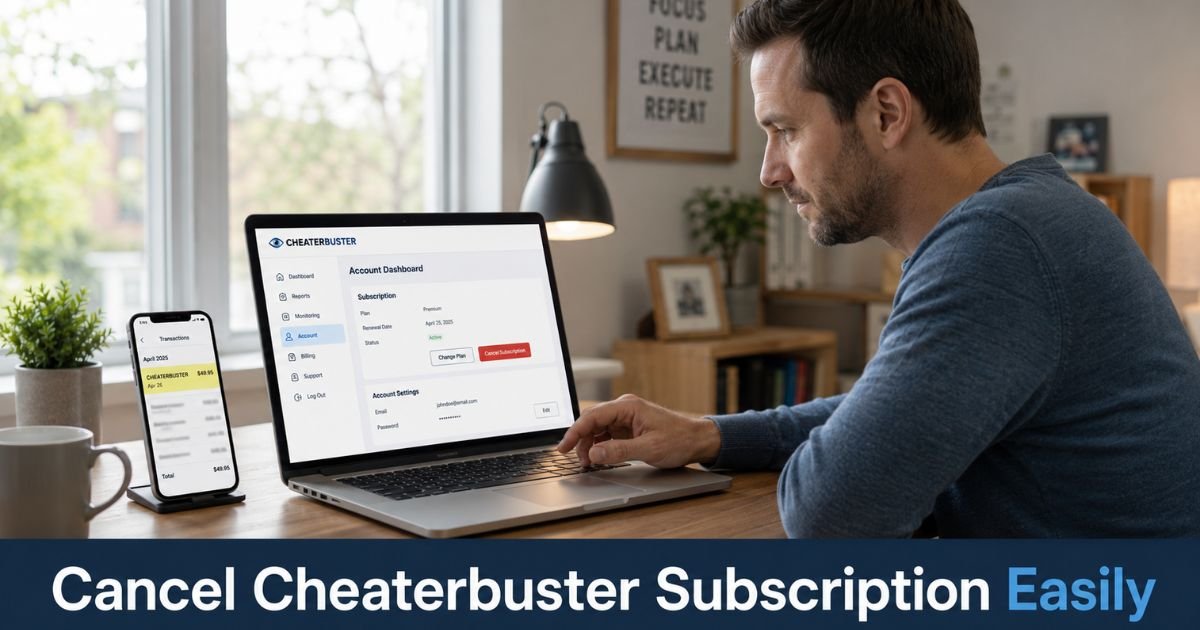
- Go to cheaterbuster.com and log into your account using the email and password you created.
- Look for the Account Settings, Subscription, or Billing section in your dashboard.
- Find the option to manage or cancel your current subscription plan.
- Click the cancel subscription button and follow any on-screen prompts to confirm your choice.
- Save or screenshot the confirmation message or email you receive.
This process usually takes just a few minutes once you are logged in. Your access continues until the end of the current billing period, after which no further charges should appear.
Contact Cheaterbuster Support to Cancel
If you cannot locate the cancel option in your account or run into any issues, reach out to their support team right away.
Email support@cheaterbuster.email from the address tied to your account. In your message, clearly state that you want to cancel your Cheaterbuster subscription immediately.
Include your account email, any transaction details or order numbers, and screenshots if you have them. Support typically responds with next steps and confirmation once the cancellation is processed.
This route works well when the dashboard option is hard to find or if you need written proof of your request.
Canceling Cheaterbuster App Subscriptions on iOS or Android
Some users subscribe through the mobile app instead of the website. In those cases, you manage the subscription through your app store.
On iPhone or iPad, open the Settings app, tap your name at the top, then tap Subscriptions. Find Cheaterbuster in the list and select Cancel Subscription. Confirm your choice and note the date it takes effect.
On Android, open the Google Play Store, tap your profile icon, go to Payments & subscriptions, then Subscriptions. Select the Cheaterbuster plan and tap Cancel subscription. Follow the prompts to finish.
Cancel at least 24 hours before your next billing date to avoid another charge.
What Happens After You Cancel Your Cheaterbuster Subscription
Once cancellation goes through, Cheaterbuster stops future renewals. You keep access to your current monitoring and search results until the end of the paid period. After that date, active weekly updates end and your account reverts to limited features.
Your previous search data may remain available for a short time, so download or note any important results before access changes. No new charges should appear on your card after the final period ends.
Pro Tip: Take a clear screenshot of your cancellation confirmation that shows the date and your account email. This record makes it much easier to dispute any stray charges with your bank or credit card company later.
Handling Cheaterbuster Charges That Continue After Cancellation
Sometimes charges still appear even after you cancel. In those situations, contact your credit card issuer or bank immediately and dispute the transaction. Provide your cancellation confirmation and explain that you already ended the Cheaterbuster subscription.
Most card companies investigate these quickly when you show proof. While you wait, keep monitoring your statements closely for the next cycle or two.
Common Mistake: Some people only dispute charges with their bank and skip canceling directly with Cheaterbuster. A dispute can help with refunds, but it does not always stop the merchant from attempting future billing. Always cancel at the source first, then follow up with your card company if charges continue.
Tips to Avoid Future Subscription Surprises
Small or introductory fees for services like Cheaterbuster can easily turn into recurring payments if you miss the fine print. Before completing any checkout, read the final screen carefully for words like “auto-renews” or “subscription.”
You can also use virtual card numbers for one-time needs or set a phone reminder a few days after signing up for any new service. Checking your bank and credit card statements every week helps you catch problems early and keeps unwanted Cheaterbuster billing from adding up.
FAQs About How to Cancel Cheaterbuster Subscription
Q: How long does it take to cancel a Cheaterbuster subscription?
Cancellation through your account usually processes right away. You keep access until the end of your current billing period, and no new charges appear after that date. Email support can confirm the exact timing for your account.
Q: Can I get a refund after canceling Cheaterbuster subscription?
Refunds depend on their policy and how recently you were charged. Contact support@cheaterbuster.email quickly with your details if you believe you qualify. For charges you did not authorize, dispute them directly with your credit card company.
Q: What if I cannot find the cancel option in my Cheaterbuster account?
Email support@cheaterbuster.email right away and clearly request cancellation. Include your account email and any transaction information. Their team can locate your subscription and walk you through the next steps or process it for you.
Conclusion
Canceling your Cheaterbuster subscription is straightforward once you log into your account or reach out to support. The main steps involve finding the cancel option in your dashboard or sending a clear email request, and both routes stop future recurring charges from Cheaterbuster for good.
Take action today while the details are fresh. Log in now, locate your subscription settings, and complete the cancellation. You will feel better knowing those automatic payments have ended and you are back in control of your finances.
Disclaimer: This content is for informational and educational purposes only and does not constitute professional, financial, legal, or medical advice. The information provided may not apply to your specific situation. Always consult a qualified professional for personalized guidance.