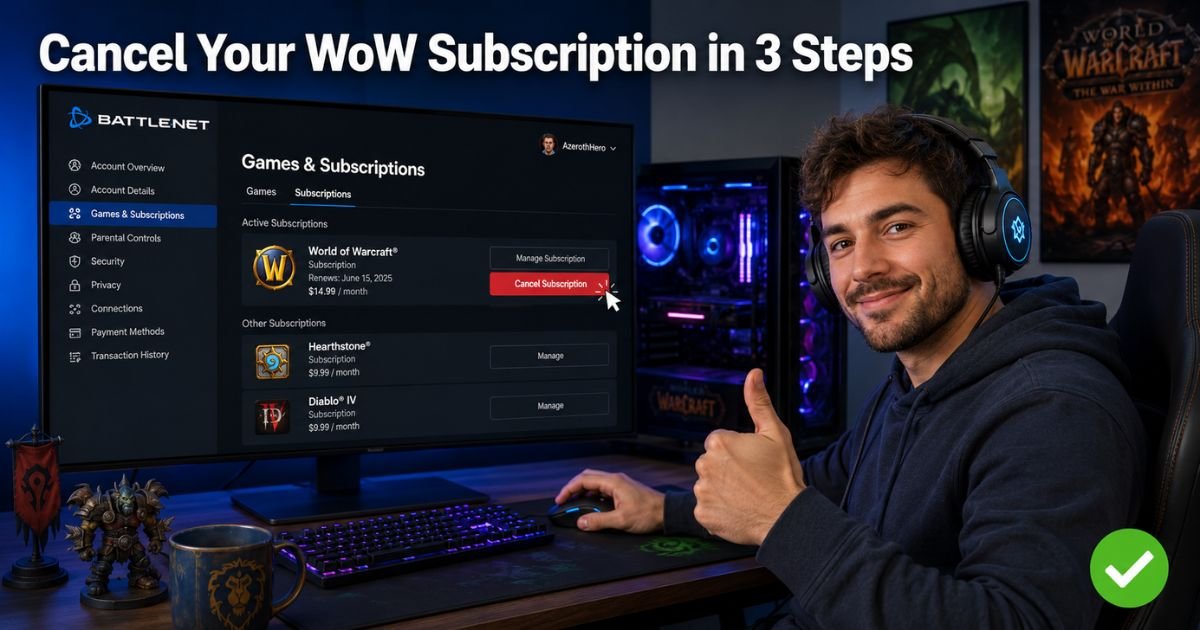
Picture this. You fired up World of Warcraft for a quick raid with friends, got hooked on the epic story and new expansion, and suddenly months have flown by with that monthly subscription quietly charging your card.
Now life is busy, you are not logging in as much, and you are wondering how to cancel WoW subscription without losing your progress or dealing with customer service headaches.
You are not alone. Millions of players hit this point every year when they need a break from Azeroth but still want to return later.
The great news is Blizzard makes canceling super straightforward through your Battle.net account. No phone calls, no long waits, just a few clicks and you are done.
I will walk you through every step to cancel your World of Warcraft subscription safely. You will learn what happens to your game time after you cancel, common pitfalls to avoid, and even some smart alternatives if you are not quite ready to walk away completely.
Why Players Cancel Their WoW Subscription
Life gets in the way. Between work, family, and other games dropping new updates, it is easy to step back from World of Warcraft for a while. Your subscription keeps renewing automatically, and those charges add up fast.
Canceling WoW subscription does not delete your character or erase your progress. It simply stops the recurring billing so you only pay for the time you actually use.
How to Cancel WoW Subscription Step by Step
Here is the quickest way to cancel WoW subscription right now. These steps work on any computer or mobile browser.
- Open your browser and go to account.blizzard.com.
- Log in with the Battle.net account tied to your World of Warcraft subscription.
- Click on Games & Subscriptions in the menu.
- Find your World of Warcraft listing and click Manage.
- Select Cancel Subscription and confirm your choice.
You will see your exact end date right away. Boom, done in under two minutes.
What Happens After You Cancel?
Your character stays safe and you can keep playing until your current game time or subscription period runs out. No partial refunds, but you will not get charged again. If you change your mind, just go back and reactivate anytime.
Canceling on Mobile or Through the Battle.net App
The website method is fastest, but here is how to handle it on other devices.
- On your phone: Open the browser, follow the same steps above. The mobile site works great.
- Battle.net desktop app: You cannot cancel directly in the app. Open a browser and use the web steps for the smoothest experience.
Pro Tip: Take a quick screenshot of the confirmation page that shows your cancellation date. It is the easiest way to prove everything if any billing questions ever come up later.
Common Mistakes to Avoid When Canceling WoW
Plenty of players run into small snags. Here are the top ones I see all the time.
Common Mistake: Trying to cancel inside the game itself or through the mobile app launcher. You must use the Battle.net website at account.blizzard.com to stop the subscription properly.
Another big slip? Forgetting which Battle.net account actually holds the subscription. Double-check you are logged into the right one before you start.
Real-Life Example
Take a 32-year-old software developer from California. He played World of Warcraft every night during a big expansion launch, but work picked up and he barely logged in for weeks. The monthly charge kept hitting his card until he followed these exact steps one evening.
He canceled his WoW subscription in minutes, saved over $150 for the year, and felt zero guilt. Six months later when a new patch dropped, he simply resubscribed and jumped right back in with all his characters waiting.
WoW Subscription Options at a Glance
Not sure which plan you had? Here is a quick breakdown to help you understand your options before you cancel.
| Subscription Type | Typical Cost | Billing Cycle | Best For | Cancellation Path |
|---|---|---|---|---|
| Monthly | $14.99–$15.99 | Every month | Flexible, short-term play | Battle.net website |
| 6-Month | Around $13/month | Every 6 months | Steady players | Battle.net website |
| 12-Month | Around $12/month | Every year | Serious raiders | Battle.net website |
| Game Time Cards | Varies | One-time | No recurring charges | No need to cancel |
Troubleshooting If You Cannot Find the Cancel Button
Sometimes the option does not show up right away. Try these quick fixes:
- Make sure you are logged into the exact Battle.net account that owns the subscription.
- Clear your browser cache or try incognito mode.
- Check if you have multiple WoW accounts linked.
- Still stuck? Use Blizzard’s live chat support or call their billing line during business hours. They can walk you through it.
What to Do If You Want to Pause Instead of Cancel
Blizzard does not offer an official pause feature, but canceling and reactivating later works just like one. Your characters stay exactly where you left them. Many players cancel during busy seasons and jump back in when they have more free time.
Checking Your Billing After You Cancel WoW Subscription
After you finish the process, head back to Games & Subscriptions to confirm it now says “Canceled” with your end date. You will also get an email from Blizzard confirming everything.
Keep an eye on your bank statement for the next cycle just to be safe.
FAQs About How to Cancel WoW Subscription
Q: Can I cancel WoW subscription during an active free trial or new expansion?
Yes, you can cancel your WoW subscription anytime, even during a trial period. Just follow the same Battle.net steps and you will not be charged when the trial ends.
Q: Will I lose access to my characters immediately after canceling WoW subscription?
No. You keep full access to World of Warcraft until your current game time expires. Finish that raid or quest line you are in the middle of without rushing.
Q: What if I subscribed to WoW through a third-party store or gift card?
If you used a game time card or third-party payment, you may not see a recurring subscription to cancel. Simply let the current time run out and do not add more. For any prepaid issues, check your Battle.net balance directly.
Conclusion
Canceling your WoW subscription is quick, easy, and gives you full control over your gaming spend. By following the simple Battle.net steps, you stop future charges while keeping every character and achievement safe until your current time ends.
Remember to screenshot that confirmation, watch for the email, and know you can always come back when the next big update calls your name. You have got this, whether you are taking a short break or stepping away for good.
Happy adventures, wherever your next quest takes you.
Disclaimer: This content is for informational and educational purposes only and does not constitute professional, financial, legal, or medical advice. The information provided may not apply to your specific situation. Always consult a qualified professional for personalized guidance.