How to Cancel Lasta App Subscription? [Step by Step]

Ever signed up for the Lasta app thinking it would be your perfect wellness coach, only to realize the charges keep hitting your card each month? You’re not alone.
Thousands of people download Lasta for its gentle home workouts, habit trackers, and personalized nutrition plans, but life gets busy and they need an easy way out.
If you’re searching “lasta app cancel subscription,” you’ve come to the right place. You’ll learn exactly how to cancel Lasta subscription on your phone, through the app stores, and what happens next.
What Is the Lasta App and Why Do People Cancel?
Lasta is a popular wellness coach app designed to help you build healthy habits through low-impact daily workouts, progress tracking, and practical nutrition advice. No gym required, just simple home routines that fit real life. It offers 28-day programs, an AI coach, water and mood trackers, and more.
Sounds great on paper, right? But many users find the subscription doesn’t quite match their schedule or budget. Maybe the workouts feel repetitive, or the automatic renewals sneak up on you. Whatever your reason, knowing how to cancel Lasta subscription gives you full control.
Common reasons include time constraints, better free alternatives, or simply wanting to pause for a while. The good news? Canceling is straightforward and your progress stays safe until the billing period ends.
How to Cancel Lasta Subscription Directly in the App
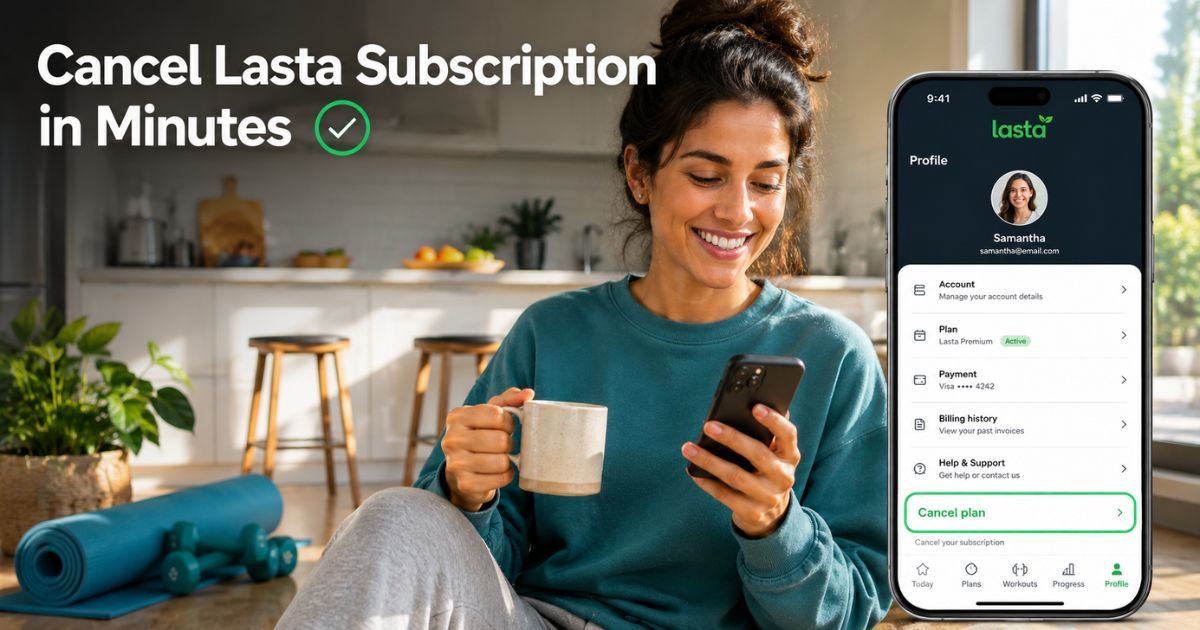
The fastest way is right inside the Lasta app itself. Follow these simple steps and you’ll be done in under two minutes.
- Open the Lasta app on your phone.
- Tap the Person icon in the top right corner of the home screen.
- Tap your profile card (the green section with your name at the top).
- Scroll all the way down and select Manage my membership.
- Tap Cancel plan at the bottom of the screen.
- Read the reminder about your progress and goals, then confirm your choice.
That’s it! Your plan stays active until the end of the current billing cycle, so you can still use everything you paid for. No more automatic charges after that.
How to Cancel Lasta Subscription on iPhone (App Store Method)
If you signed up through the Apple App Store, you might need to cancel via your iPhone settings too. Here’s how:
- Open the Settings app.
- Tap your name at the top.
- Tap Subscriptions.
- Find Lasta in the list and tap it.
- Tap Cancel Subscription and confirm.
Apple will send you a confirmation email. Easy, right?
How to Cancel Lasta Subscription on Android (Google Play Method)
Android users can cancel straight from the Google Play Store:
- Open the Google Play Store app.
- Tap your profile icon in the top right.
- Select Payments & subscriptions > Subscriptions.
- Locate Lasta and tap it.
- Tap Cancel subscription and choose a reason.
- Confirm the cancellation.
You’ll get a confirmation right away. Super simple.
Pro Tip: Always take a screenshot of your cancellation confirmation screen. This little habit can save you hours if you ever need to dispute a charge later.
What Happens After You Cancel Your Lasta Subscription?
Once you cancel Lasta subscription, your access continues until your current billing period ends. You won’t lose any saved progress or data right away. After that date, the app becomes limited or prompts you to resubscribe.
Uninstalling the app does not cancel your subscription—many people make this mistake and still get charged. Always use the steps above instead.
Take a 38-year-old teacher from Texas. She loved Lasta’s gentle walking workouts at first but found the monthly fee too much with school starting back up. She followed the in-app steps, confirmed the cancellation, and kept using the app for the rest of her paid month. “It felt empowering,” she says. “No surprise charges, and I could focus on free YouTube routines instead.”
Common Issues and How to Fix Them
Sometimes users still see charges after canceling. Here’s why and what to do:
- You have multiple accounts or devices linked.
- The subscription was purchased through a different payment method.
- Cancellation didn’t go through because of a glitch (rare, but contact support).
If you spot an extra charge, reach out to Lasta support at support@lasta.app right away with your order details.
Common Mistake: Thinking that deleting the Lasta app or your account automatically stops billing. It doesn’t. You must cancel the subscription separately or you’ll keep getting charged.
Lasta Subscription Refund Policy – What You Need to Know
Lasta’s policy is pretty standard: subscriptions are generally non-refundable once the billing period starts. However, you can request a refund within 14 days of purchase in some cases, especially if you never received login details or the app didn’t work properly.
For App Store or Google Play purchases, refunds go through Apple or Google’s policies instead. Contact support@lasta.app and attach screenshots of your issue. Be polite and clear, most teams respond within a few days.
| Cancellation Method | Best For | Time Needed | Confirmation Sent By |
|---|---|---|---|
| In-App (Person icon) | Quickest option | Under 2 min | Lasta app/email |
| iPhone Settings | App Store purchases | 1-2 min | Apple |
| Google Play Store | Android users | 1-2 min | |
| Email Support | Refund requests | 1-3 days | Lasta team |
Tips to Avoid Future Subscription Surprises
Set a reminder in your phone calendar a few days before your next billing date. Review your subscriptions monthly in your phone settings. And if you’re not using an app weekly, it’s okay to let it go, your health journey doesn’t depend on one tool.
Many people switch to free alternatives like YouTube workouts or built-in phone trackers after canceling Lasta subscription. You can always come back later if you miss the AI coach.
FAQs About Lasta App Cancel Subscription
Q: Can I cancel Lasta subscription anytime without losing my progress?
Yes! You can cancel Lasta subscription at any point, and your current plan stays active until the billing period ends. All your logged workouts, weight data, and habits remain in your account so you can pick up where you left off if you return.
Q: How do I know if my Lasta app subscription is canceled successfully?
You’ll see a confirmation message in the app and usually get an email from Lasta, Apple, or Google. Check your Subscriptions list in phone settings to make sure it shows as “Canceled” or “Expired.” No more charges will appear on your statement.
Q: What should I do if I was charged after canceling my Lasta subscription?
First, double-check the cancellation date. If you still see a charge, contact support@lasta.app with your receipt and cancellation confirmation. For App Store/Google Play issues, reach out to them directly, they handle most refund requests quickly.
Conclusion
Canceling your Lasta subscription doesn’t have to be complicated or stressful. Whether you use the simple in-app steps, your phone settings, or need a quick refund chat, you now have everything you need to stop the charges and move forward confidently.
Take five minutes today, follow the steps that match your device, and enjoy that extra peace of mind. Your wellness journey continues on your terms.
If you ever want to try Lasta again, the door is always open. Until then, keep moving, keep tracking, and keep choosing what works best for you.
Disclaimer: This content is for informational and educational purposes only and does not constitute professional, financial, legal, or medical advice. The information provided may not apply to your specific situation. Always consult a qualified professional for personalized guidance.