
DL Billing Com Charge on Credit Card [Identified]

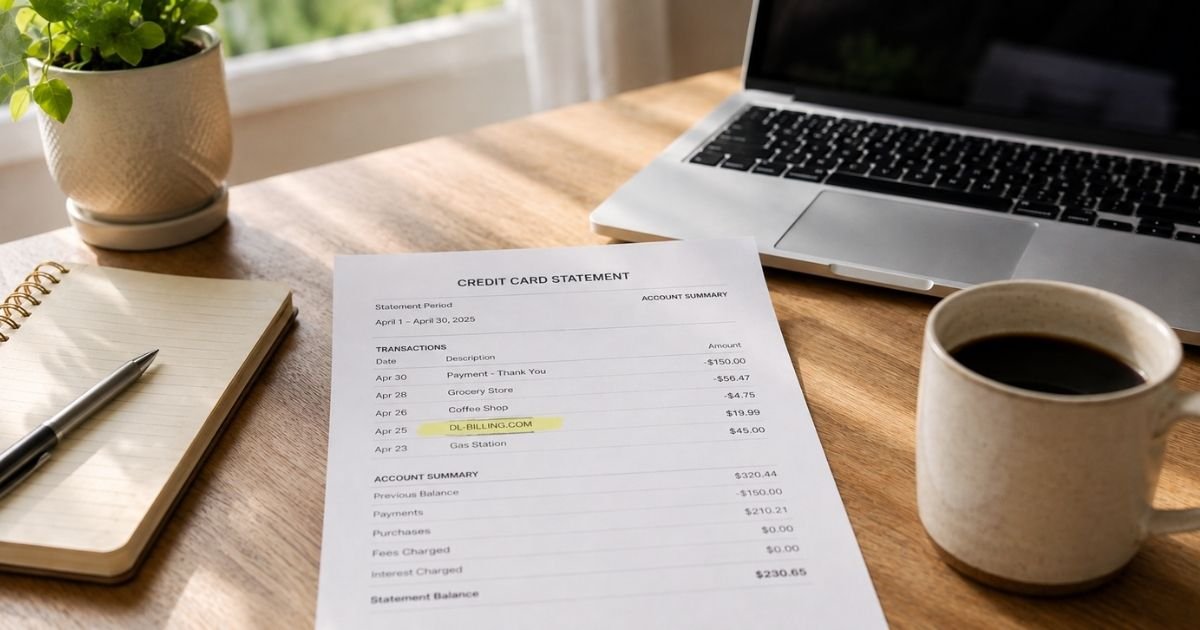
You scan your statement and see DL Billing Com or DL-BILLING.COM. The name does not match a store you remember. That can feel unsettling, but the line usually has a simple explanation.
A DL Billing Com charge on credit card typically comes from a membership billed for Doublelist or a related partner site. The site name you used may not be the name that prints on the bill.
What Is a DL Billing Com Charge on Credit Card?
DL Billing Com is generally the billing name used for Doublelist memberships. Doublelist is an online personals and classifieds site. Its billing support site, dl-billing.com, says a DL-billing charge means you have an active subscription with Doublelist.com or a partner site.
On statements, the line often appears as DL-BILLING.COM. Some issuers also show a phone number and state code, such as 415-2269270CA. That extra text is typically part of the merchant descriptor, not a separate fee.
The operator listed on Doublelist policy pages is Interlaced Social LLC in San Francisco. Plan names and prices can change, so treat any dollar amount on your statement as specific to your account.
Why You Might See This Charge
You may have signed up for a Doublelist membership on the website or in the app. The company describes monthly and annual plans that auto-renew unless you cancel.
You might also see a small charge first, then a larger renewal later. Recurring billing is easy to miss if the confirmation email went to spam or you used a different email than the one you check now.
Someone who shares your card could have created the account. Ask household members before you assume fraud. If nobody recognizes it, treat the line as unrecognized and start with official billing contacts.
How to Confirm the Charge
Search your inbox for Doublelist, dl-billing, and the exact amount. Check spam and promotions folders. Look for a membership receipt or renewal notice.
Compare the charge date with any recent signup or app purchase. If you used the Doublelist app, also check Apple or Google subscription lists. Then log in and open Settings, then Membership, to see the plan that is billing you.
How to Cancel a DL Billing Com Subscription
Cancel on the same platform that billed you. A website membership is not the same as an App Store or Google Play subscription.
For a site membership, dl-billing.com says to click Settings in the top right, open the Membership page, and choose Cancel my subscription under the plan types. Doublelist terms also say you can cancel by email at billing@doublelist.com.
Company pages say cancellation generally stops the next renewal. Access typically lasts until the end of the term you already paid. They state they do not charge a cancel fee.
If you subscribed in the iPhone app, cancel in Apple Settings under your name, then Subscriptions. On Android, use Google Play subscriptions. Canceling on the website will not stop an app store plan.
How to Request a Refund
Ask billing support first. Doublelist’s help articles say refunds typically cannot be issued once a plan has started. They also say a mid-cycle cancel generally ends at the close of the billing period, with no partial refund for unused days.
Policy pages still tell you to email billing@doublelist.com if there was a mistake. The dl-billing.com FAQ says to contact them right away if you were billed without consent, and that they will review the case.
Include the charge date, amount, last four card digits, and account email. Do not assume money will return automatically. Doublelist has said an approved refund typically takes about three to seven business days.
What to Do If You Do Not Recognize the Charge
Write down the exact descriptor, date, and amount. Search your email and app purchase history. Ask anyone who shares the card.
Then contact Doublelist billing through the official emails or the form on dl-billing.com. Ask which account and plan produced the charge. Request cancellation in the same message if you do not want future billing.
If you get no useful answer, call the number on the back of your card. Ask your issuer to review an unrecognized or recurring charge. For many credit card billing errors, you typically need to notify your issuer in writing within 60 days of the statement that shows the charge.
How to Dispute a DL Billing Com Charge
Try the merchant first when you can. Issuers often ask whether you already contacted the seller. Keep copies of your emails and cancel screenshots.
Open a dispute in your card app or by phone if the charge is unauthorized, the subscription continued after you canceled, or you cannot get a response. Explain the facts in plain language. Outcomes may vary by issuer.
A dispute is a formal review, not a guaranteed refund. Use it when you have a real problem. Watch your next statements to confirm recurring billing has stopped.
Official Contact Options
Use contacts published on Doublelist and dl-billing.com pages, and recheck them before you write. Details can change.
| Method | Published details |
|---|---|
| Billing support site | dl-billing.com |
| Membership site | doublelist.com |
| Billing email | billing@doublelist.com |
| General support email | support@doublelist.com |
| Help center | help.doublelist.com |
| Number often on statements | 415-226-9270 (confirm any number before you rely on it) |
The 415 number often appears inside the statement descriptor. Official billing pages lean on email and the Membership settings page more clearly than phone support.
FAQs About DL Billing Com Charge on Credit Card
Q: Is a DL Billing Com charge a scam?
Not automatically. DL-BILLING.COM is the name Doublelist uses to bill many memberships. Still, any charge you cannot match deserves a closer look through email, account settings, and official billing contacts.
Q: Why doesn’t Doublelist appear on my statement?
Many sites bill under a short processor or billing brand. Here, the descriptor is typically DL-BILLING.COM instead of the site name. That is why the line can look unfamiliar even when the membership is real.
Q: Will I get my money back if I cancel today?
Usually not for time already paid. Doublelist pages say refunds typically are not issued once a plan has started, and unused days generally are not prorated. Ask billing if your case was an error or an unauthorized charge.
Q: How do I stop future DL Billing Com charges?
Cancel the membership in Doublelist Settings, or email billing@doublelist.com. If you bought the plan in an app, cancel through Apple or Google. Then watch your next statement to confirm the recurring charge has stopped.
Conclusion
A DL Billing Com charge on credit card usually points to a Doublelist membership billed under a short statement name. Check your email, cancel in Membership settings or through the app store that billed you, and write billing support if you need the charge reviewed.
If the line still does not make sense, your card issuer can help you review or dispute it. You have a path forward, and you do not have to guess alone.
Disclaimer: This article is for general information only. It is not financial, legal, or tax advice. Billing names, refund rules, and dispute timelines typically vary by merchant and card issuer. Verify current contact details on the company’s official websites. For account-specific questions, contact Doublelist billing or your bank.


