
NBX Charge on Credit Card [Identified]

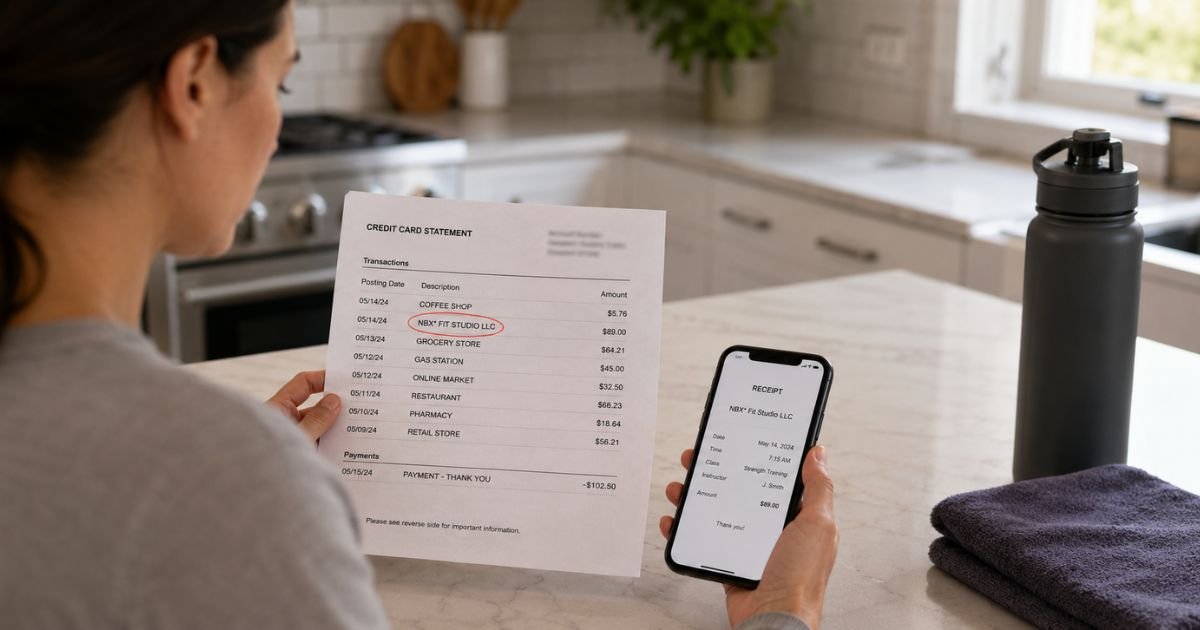
An NBX charge on credit card can look incomplete. Three letters do not tell you the store. That is why this line confuses people.
NBX is typically a prefix, not a product you bought. Official payment docs show NBX* plus a business name. Read the rest of the line first. Then match the date and amount to a receipt.
What Is an NBX Charge on a Credit Card?
NBX is not one nationwide store. Your bank shortens merchant names. The letters before the star are often the processor. The words after the star are usually the business.
Paysafe merchant materials use NBX as a billing-descriptor example. One official glossary shows a line like NBX*DARRELSDONUTS. That means the donut shop charged your card through NETBANX, Paysafe’s processing brand.
Mindbody’s Paysafe help page documents the same pattern for Canada card payments. It says the credit card descriptor is NBX* plus the merchant’s DBA name and phone number. An example is NBX*WellnessWarrior followed by a phone number.
If you used a U.S. card at a Canadian studio, gym, or shop on Paysafe, you may see that format. Some other NETBANX merchants use a similar short prefix. The safe move is the same. Do not stop at “NBX.” Read what comes after it.
How to Read the Statement Line
Issuers cut text in different ways. Look at every word, the city, and any phone number.
| What you may see | What it typically means |
|---|---|
| NBX* plus a shop or studio name | NETBANX/Paysafe processed a payment for that business |
| NBX*Name plus a phone number | Same pattern. The number is often the merchant’s support line |
| NBX and a fitness or wellness name | Common for gyms and studios that bill through Paysafe partners |
| NBX.com or Norwegian Block Exchange wording | May be the Nordic crypto platform, not a local shop |
| NumberX* or Number X LLC | A different digital checkout company. Not the same as NBX* |
A recurring amount often points to a membership. A one-time amount may be a class, product, or card-on-file sale. A small pending amount can be a temporary card check. Pending authorizations typically drop off if they are not captured.
Common Reasons You See NBX
Most recognized NBX* charges come from a local business that uses Paysafe or NETBANX. Fitness studios, wellness shops, and other small merchants are frequent examples because Mindbody and similar tools route card billing through Paysafe in some regions.
You might not remember the processor name. You paid the studio. The studio’s payment partner printed NBX* on the statement.
A less common match is Norwegian Block Exchange, the Nordic company at nbx.com. That firm runs a crypto platform and has offered an NBX Visa card program in the Nordics.
If you bought crypto there with a card, the purchase may show an NBX-related label. That is a different company from a U.S. gym using Paysafe.
Generic “NBX Club” or nbxclub.com writeups circulate online. Those pages are not official Paysafe or nbx.com help. Do not treat them as the default explanation unless your statement actually names that site.
How to Identify Your NBX Charge
Work from the full descriptor, not the three letters alone.
- Copy the exact line from your statement or app.
- Read the name after NBX or NBX*.
- Match the date and amount to email receipts and texts.
- Check gym, studio, class-pack, or small-shop accounts from that week.
- Ask anyone who shares the card or a saved wallet.
- Call the phone number printed on the same line, if there is one. Ask what business it belongs to.
If the line names a studio you use, log in there. Open billing or membership history. The charge should match a class pack, monthly dues, or a late fee.
If the line points to nbx.com activity, log in at nbx.com and review orders or card settings. Use that site’s help tools only for that account.
How to Stop or Reverse an NBX Charge
Cancel with the business that sold you the service. The processor generally cannot cancel a gym membership for you.
For an NBX* studio or shop charge:
- Log in to the business account or app.
- Cancel the membership, class pack auto-renewal, or saved card.
- Ask the business for a written cancel confirmation.
- If you need a refund, ask that same business first. Paysafe processes the payment. The merchant usually issues the credit.
Paysafe lists NETBANX merchant support at 1-888-709-8753 and customersupport@paysafe.com. Those contacts are built for merchants. You can still ask them which business name sits on the charge. Keep the date, amount, and last four card digits ready.
For an nbx.com crypto or card-program charge, use the help options on nbx.com. Older Nordic card terms have listed card@nbx.com. Confirm the current contact on the official site before you email.
Deleting an app does not stop a card-on-file membership. You generally have to cancel inside the account or with the merchant.
What If You Do Not Recognize the Charge?
An unfamiliar prefix is not automatic fraud. Forgotten class packs and household use are common. Unauthorized use is still possible.
If nobody recognizes the business name after NBX*:
- Call the number on the statement line, if one appears.
- Search the full merchant string, not just “NBX.”
- Ask Paysafe NETBANX support which DBA name is on the transaction.
- Change passwords on email and any site that stored the card.
- Call the number on the back of your card and ask about a dispute or a replacement card.
Do not give a full card number, CVV, or one-time passcode to anyone who called you first. Use published support pages or the number on your card.
Refund timing varies. Some merchants credit quickly. Some issuers reverse a charge after a dispute. There is no single published refund rule for every NBX line.
Lookalikes That Are Not the Same Charge
Several names look close and are easy to mix up.
- Number X prints NumberX* or Number X LLC for digital checkouts. That is a different firm.
- NYX* appears on some overseas unattended or vending payments. That is not NBX.
- NAC or naceft.com is National Acceptance Company, a gym and club biller. Different letters.
- North American Bancard is a merchant processor often shortened in other ways, not as NBX*.
- NBX Bikes in Narragansett, Rhode Island, is a local shop. A store sale would typically show more than three letters.
If your line includes those other names, follow that name. Do not assume every short “N” code is NETBANX.
FAQs About NBX Charge on Credit Card
Q: Is an NBX charge a scam?
Not by itself. Official Paysafe materials treat NBX* as a normal billing descriptor for a merchant name. A real processor can still post a charge you forgot or did not authorize. Identify the business after NBX*, then cancel or dispute if needed.
Q: Why doesn’t the line show the gym or store I used?
The business likely billed through NETBANX or Paysafe. Your issuer then prints the processor prefix plus a short DBA name. Mindbody’s Canada Paysafe help page shows that exact pattern. The shop name should still appear after NBX* in many cases.
Q: How do I contact someone about an NBX charge?
Start with the business named on the line. Use the phone number printed next to NBX* if you have one. Paysafe lists NETBANX support at 1-888-709-8753 and customersupport@paysafe.com. For a possible nbx.com crypto charge, use help on nbx.com.
Q: Can I cancel through Paysafe instead of the gym?
Paysafe generally processes the card payment. Membership cancel rules sit with the merchant. Cancel in the gym or studio account, then ask that business for a refund if the charge was a mistake. Use your card issuer if the merchant will not help or you never authorized the sale.
Conclusion
An NBX charge on credit card is typically a shortened processor label, most often NBX* plus a business name used by NETBANX or Paysafe. Match the rest of the line to a receipt. Cancel with that merchant if it is a membership.
If the wording points to nbx.com instead, check that account separately. If no name fits and nobody in your home used the card, call your issuer after you gather the date, amount, and full descriptor.
Disclaimer: This article is for general information only. It is not financial, legal, or consumer-rights advice. Billing names, refund rules, and dispute windows vary by merchant and card issuer. Confirm account-specific questions with the business on the statement, Paysafe or NETBANX if they processed the payment, or your bank.


